
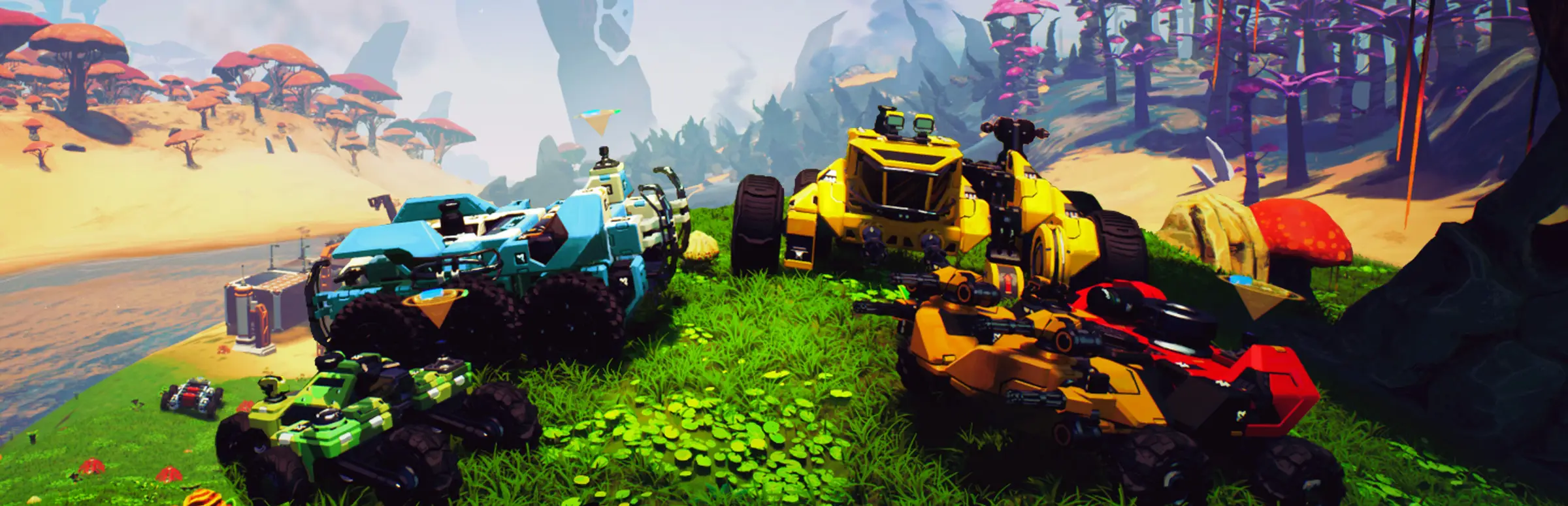
TerraTech Worlds server hosting: colourful armoured buggies and a yellow bulldozer on an alien hilltop of giant mushrooms

An always-on planet for your crew

TerraTech Worlds Server Hosting

TerraTech Worlds is Payload Studios' build-craft adventure on an uncharted alien world: design vehicles block by block, automate factories, terraform the ground and fight enemy Techs across a 300km² planet. TerraTech Worlds server hosting keeps that world running between sessions, so your crew can drop in and keep building even when the host is away.

Excellent on Trustpilot Hosting since 2004 9 locations 24/7 support in 9 languages

Pick your crew size

TerraTech Worlds Server Hosting Plans and Prices

The order form sells TerraTech Worlds in three sizes: 4, 6 and 8 slots. The 4 slot plan comes with the free 5GB tier, and the larger crews get more memory, because every extra Prospector means more Techs, bases and conveyor lines loaded at once. Monthly billing, no minimum term.

  1. 4player slots
    5GB RAM

    A duo or a small co-op crewStarter crew

    • The lowest-cost TerraTech Worlds server
    • Shared bases and Techs
    • Free 5GB memory tier
    €5.46/moMonthly, no contract
  2. 6player slots
    8GB RAM

    A full squad of buildersMost popular

    • Split mining, combat and logistics
    • More factories on the map
    • 8GB memory
    €11.47/moMonthly, no contract
  3. 8player slots
    12GB RAM

    The biggest crew we sell

    • Large automated bases
    • Plenty of Techs in the world
    • 12GB memory
    €18.24/moMonthly, no contract

Every plan: NVMe 7500MB/s · 5.0GHz · Up to 100GB. No setup fee. Upgrades and details

In short

Gaming Deluxe hosts TerraTech Worlds dedicated servers from €5.46/mo, in plans of 4 to 8 player slots with 5GB to 12GB of RAM. Choose from 9 locations in the UK, France, Germany, the US and Australia; the server is set up automatically after payment, with its config file and saves open to you.

Key facts checked against our order form, updated .

  • 4 to 8 player slotsPlans for small co-op crews
  • 5GB to 12GB RAMSteps up with each plan
  • 9 locationsSame price in every one
  • Planet choiceDedicated server planet selection
  • Always onlineYour factory keeps its place
  • Offsite backupsSeven days, one click restore
  • DDoS protectionOn every server
  • 24/7 support in 9 languagesGame hosting since 2004

Run it from a browser

Your TerraTech Worlds Server Hosting Control Panel

A TerraTech Worlds dedicated server reads its settings from a config file and keeps your planet in its save folder. The panel gives you both, plus a live console, from any browser.

Gaming Deluxe game server control panel with the server menu, connection details and Stop and Restart buttons

The Gaming Deluxe control panel, shown with a Windrose server. TerraTech Worlds servers use the same panel.

Edit the config file

Change the server name, password and planet setting in the browser, then restart.

Upload a save

Move a world you started in single player or on your own PC onto the server over SFTP.

Watch the console

See the planet load, players connect and any errors as they happen.

Snapshot before updates

Early Access patches change things; back up the save first and roll back if needed.

Branch switching

If your whole crew wants to test the unstable branch, talk to our support team before switching the server.

Sub user logins

Let a crewmate restart the server without handing over your account.

Early Access updates

TerraTech Worlds Server Hosting and Early Access Updates

TerraTech Worlds entered Steam Early Access on 22 March 2024 and is still in active development. Payload Studios, now a smaller team after a hard 2024, partnered with Mythwright for publishing in 2025 and has said it is committed to reaching 1.0. Recent stable updates have added new planets and tightened dedicated server support.

Early Access22 March 2024Update 0.725 February 2026Update 0.829 April 2026

01

Classic mode, April 2025

Update 0.6.2 introduced Classic mode and fixed a dedicated server crash when using a Fragmenter.

02

Planet Phaeton, February 2026

Update 0.7 added a second planet with more land and freer progression, unlocked after the Nibiru tutorial, plus fast travel between traders and Bastion S.E.E.D.s.

03

Planet selection for servers

The 0.7 unstable builds added dedicated server support for planet selection, and let an empty server slot load any save.

04

Planet Tyr, April 2026

Update 0.8 brought Tyr, a water world of archipelagos where you build boats to cross between islands. In July 2026 the team previewed new weapons, tank tracks and boosters for a coming update.

Planets & Techs

Planets, Techs and the Workshop on TerraTech Worlds Server Hosting

TerraTech Worlds is not a mod-heavy game. What a crew shares is its Techs, its planet and its progress, and the Steam Workshop handles the first of those.

Planets

Nibiru

The starting planet, where the tutorial and the original biomes live.

Phaeton

Added in Update 0.7: bigger land masses, less sea and freer progression.

Tyr

Added in Update 0.8: islands and open water, so seafaring Techs matter.

Techs and players

Tech Snapshots on the Workshop

Payload confirmed Steam Workshop support for sharing Tech Snapshots, so a crew can swap vehicle designs.

Steam on Windows

Steam lists TerraTech Worlds for Windows with online co-op. There is no console version to plan around.

Matching builds

Server and players must run the same game version, which matters when Early Access patches arrive.

Windows

Memory per plan

RAM for TerraTech Worlds Server Hosting

Payload lists 16GB of RAM as the minimum to play TerraTech Worlds, which says something about how much simulation it does. A server does not render anything, but it does track every Tech, block, factory and enemy base in the areas players are in. The 4 slot plan starts on the free 5GB tier, and the 6 and 8 slot plans add memory for more players spread across the planet.

  • Duo or trio

    Plan: 4 Slots
    Memory: 5GB

    Why: A few Techs and one base.

  • Full squad

    Plan: 6 Slots
    Memory: 8GB

    Why: Several bases and production lines.

  • Large crew

    Plan: 8 Slots
    Memory: 12GB

    Why: Players spread across the map, lots of automation.

The order form offers 5GB, 8GB, 12GB, 16GB, 20GB, 24GB and 32GB. Big factories grow over time; raise the memory tier from the client area whenever you need to and your save stays put.

Smooth driving

TerraTech Worlds Server Hosting Locations and Ping Test

Pick from 9 locations in the UK, France, Germany, the United States and Australia. Driving a heavy Tech over rough ground is smoother on a low ping, so test from your own PC and choose the best result for most of your crew.

LondonUnited Kingdom · Europe -
ParisFrance · Europe -
FrankfurtGermany · Europe -
New York (Buffalo)United States · North America -
DallasUnited States · North America -
Los AngelesUnited States · North America -
ChicagoUnited States · North America -
MiamiUnited States · North America No test
SydneyAustralia · Oceania -

Always-On Protection

TerraTech Worlds Server Hosting with DDoS Protection

Watch how our multi-layered defence system filters malicious traffic while legitimate connections pass through uninterrupted.

Internet DDoS Protection Game Server

Malicious traffic is filtered at the edge, while legitimate traffic passes through uninterrupted.

Malicious Traffic (Blocked)Legitimate Traffic (Allowed)

At Every Location
Included
Full Protection
Layer 3/4/7
24/7 Active Filtering
Always-On
Added Latency
<1ms

In every plan

What TerraTech Worlds Server Hosting Includes

No setup fee and no compulsory extras. Every TerraTech Worlds plan includes the following, as listed on the order form today.

  • Game serverA TerraTech Worlds dedicated server
  • Slots4, 6 or 8
  • Memory5GB, 8GB or 12GB by plan, tiers up to 32GB
  • Storage100GB NVMe at 7,500MB/s, with 200GB and 14,000MB/s options
  • Processor5.0GHz as standard, 5.2GHz+ and 5.6GHz+ available
  • Locations9, one price
  • File accessFile Manager and SFTP
  • BackupsSeven days of offsite copies
  • ProtectionDDoS filtering
  • Support24/7 tickets

Optional upgrades

Added at checkout, billed with your plan.

  • Memory AllocationTiers up to 32GBtiered
  • Hard DiskNVMe 14,000Mb/sfrom €5.82
  • CPU Clock Speed5.2GHz+ - 5.6GHz+from €5.82
  • CPU PriorityHigh CPU Priority - Realtime CPU Priorityfrom €5.82
  • VIP Ticket Priority SupportPrioritise My Ticket Pleasefrom €2.32
  • Disk SpaceUp to 120GB - Up to 200GBfrom €8.16

Each plan includes the memory shown. More RAM, a faster CPU, CPU priority and extra disk are optional on the order form. All locations cost the same; test ping and choose the one nearest your crew. Prices read from our order form on 23 October 2026. Taxes, if any, are shown at checkout.

Built for co-op

TerraTech Worlds Server Hosting Features

What a dedicated server adds to co-op.

No host needed

The planet is online even when the friend who usually hosts is not.

Drop-in co-op

Crewmates join on their own schedule and pick up where the factory left off.

Password protected

Keep the server to your crew so nobody wanders into your base.

Safe saves

Snapshots and offsite copies protect weeks of building from a bad patch.

DDoS protection

Filtering stops attack traffic before it reaches the planet.

5.0GHz cores

Physics-heavy Techs and long conveyor lines like fast single cores.

Before you land

TerraTech Worlds Server Hosting Essentials Before You Order

Four things to settle before your crew lands.

  1. It is Early Access

    Payload still changes the game. Expect updates that need the server and players to move to the new build together.

  2. Stable or unstable

    New features land on the unstable branch first. Keep the server on the default branch unless the whole crew switches.

  3. Pick a planet

    Decide whether the crew starts on Nibiru or a later planet; dedicated servers gained planet selection in the 0.7 builds.

  4. Back up before patches

    Take a snapshot of the save before every update, so a broken change never costs you a base.

Answers

TerraTech Worlds Server Hosting Questions

Answers for Prospectors running their own planet.

Getting started

How quickly is my TerraTech Worlds server ready?

It is installed automatically after payment, and the connection details arrive by email. Most crews are online within minutes.

How do my friends join?

They join from the game's multiplayer menu using the server address and port shown in your panel.

Which location should I choose?

Run the ping test on this page from your PC and pick the lowest result for most of the crew. Every location costs the same.

Worlds and updates

Can I bring my existing world?

Yes. Upload the save over SFTP. Since the 0.7 builds an empty server slot will load any save format, so older saves are easier to move.

Can the server run Phaeton or Tyr?

Dedicated servers gained planet selection in the 0.7 unstable builds, and Phaeton and Tyr arrived in Updates 0.7 and 0.8. Set the planet in the server config.

What happens when the game updates?

The server and every player need the same version. Restart the server after a patch; if it stays on the old build, our support team will update it.

Can we play on the unstable branch?

Only if everyone in the crew is on it, since versions must match. Open a ticket first and our support team will tell you what is possible for your server.

Players and performance

Why only up to 8 slots?

TerraTech Worlds is built around co-op crews, and 4, 6 and 8 slots are the sizes on our order form.

Why do bigger plans get more RAM?

Each extra player brings more Techs, bases and automation into the simulation, so 6 and 8 slots step up from 5GB.

Plans and billing

How much does TerraTech Worlds server hosting cost?

The 4 slot plan is €5.46 a month. The 6 and 8 slot plans cost more and include more memory. All locations are the same price.

Can I upgrade later?

Yes. Move to a bigger plan or memory tier from the client area. The planet and its saves stay where they are.

Is there a minimum contract?

No. Monthly billing can be cancelled any time, and longer terms are offered on the order form.

The complete guide · 4 min read

TerraTech Worlds Server Hosting: The Complete Guide

How to run a TerraTech Worlds dedicated server for your crew: what the game is, why a server beats hosting from a PC, picking a size and a planet, configuration, saves, Early Access updates and the habits that keep a long factory build safe.

By , Owner, Gaming DeluxePublished · Updated

In this guide
  1. TerraTech Worlds at a Glance
  2. Why a Dedicated Server Beats Hosting From Your PC
  3. Choosing a Size and Memory
  4. Choosing a Planet: Nibiru, Phaeton and Tyr
  5. Configuring the Server and Moving Saves
  6. Living With Early Access Updates
  7. Habits That Keep a Long Build Safe
  8. What to Compare Before You Rent a TerraTech Worlds Server
  9. TerraTech Worlds Server Glossary
  10. TerraTech Worlds Server Help and Next Steps

TerraTech Worlds at a Glance

TerraTech Worlds is an open-world build-craft adventure from Payload Studios, the team behind TerraTech. You land on an alien planet as a Prospector, design Techs, vehicles built block by block for mining, hauling or combat, and grow a base into automated production lines that refine minerals and keep you stocked with ammunition. Terraforming tools let you reshape the ground, from flattening a racetrack to raising walls for defence.

The planet itself is the draw: 300km² with no loading screens, a day and night cycle, weather, dangerous plants, hostile enemy factions and bases to raid. It is playable solo, but it is at its best in co-op, where one player mines, another designs combat Techs and someone else keeps the factory fed.

Why a Dedicated Server Beats Hosting From Your PC

In listen-server co-op the world only exists while the host plays. A dedicated server removes that problem: the planet is always reachable, crewmates can join at different times, and the host is not running the simulation and the game on the same machine, which matters in a game that asks for 16GB of RAM just to play.

  • Always reachable: the factory is there whenever anyone logs in.
  • Fair performance: nobody gets a host advantage or carries the load.
  • Safe saves: offsite copies instead of one person's hard drive.
  • Planet choice: dedicated servers can now be set to a specific planet.

Choosing a Size and Memory

The order form offers three sizes, and the choice is simply how many people are in your crew. Memory is the bigger question over time: a planet with a handful of Techs is light, while a sprawling automated base with conveyors, fabricators and generators keeps a lot in RAM.

Our suggestions (a guide, not a rule)
CrewPlanMemory on that plan
Two or three friends4 Slots5GB
A full squad6 Slots8GB
Large crew, big factories8 Slots12GB

If the server starts to stutter once the base is huge, move up a memory tier from the client area. The save is untouched, and the server comes back with more headroom.

Choosing a Planet: Nibiru, Phaeton and Tyr

For most of Early Access, Nibiru was the only world. Update 0.7 on 25 February 2026 added Phaeton, a planet with more land and less sea and more freeform progression, unlocked after the Nibiru tutorial. Update 0.8 on 29 April 2026 added Tyr, a water world of small islands where bridges link the close ones and seafaring Techs reach the rest.

The three planets so far
PlanetAddedWhat to expect
NibiruStart hereThe tutorial planet, with Woodlands, acidic Swamps and the snowy Arctic.
PhaetonUpdate 0.7More land, freer progression, no onboarding.
TyrUpdate 0.8Archipelagos and open sea; build boats.

Payload added dedicated server support for planet selection in the 0.7 unstable builds, so the server can be told which planet to run. New crews usually start on Nibiru; groups who already know the game often go straight to Phaeton or Tyr.

Configuring the Server and Moving Saves

TerraTech Worlds dedicated servers take their settings from a config file, which you edit in the panel's File Manager. Payload's own patch notes mention fixes to that file, so after a big update it is worth opening it to check nothing has changed name.

  1. Stop the server and open its config file.
  2. Set the server name and a password for your crew.
  3. Choose the planet you want to run.
  4. To bring a world, upload its save over SFTP to the server's save folder.
  5. Start the server and watch the console as the planet loads.

Living With Early Access Updates

Payload releases features to an unstable branch first, publishes patch notes for each unstable build, then ships a stable update with hotfixes. Dedicated servers have been part of those notes throughout: crash fixes when players join, when traders reset and when Fragmenters were used, and support for crash reports on dedicated servers from March 2024.

For a crew that means two simple habits. Keep the server on the stable branch unless everyone moves to unstable together, and take a snapshot before each update. If the new build breaks something, restore the snapshot and open a ticket so our support team can look at it with you. Payload's July 2026 development update previewed new weapons, tank tracks and booster blocks, so more changes are on the way.

Habits That Keep a Long Build Safe

Give each crewmate a role and keep the server password to the crew. Share Tech Snapshots on the Steam Workshop so everyone builds from the same designs. Set a nightly restart for when nobody is playing, which keeps memory tidy on a long-running factory planet.

Snapshots before risky experiments and the offsite backups we keep for the last 7 days mean an accident, an angry enemy base or a bad patch never wipes out weeks of work. If you move from another host, upload your save and config, start the server and the planet carries on.

What to Compare Before You Rent a TerraTech Worlds Server

Worth checking with any host.

  1. Memory per planA big factory needs more RAM than a fresh landing.
  2. Save accessYou should be able to upload and download your planet.
  3. Update helpAsk how the host handles a new Early Access build.
  4. Backups before patchesEarly Access needs a way back.
  5. PingTest from your PC before you buy.
  6. Fair termsLook for setup fees and minimum contracts.

TerraTech Worlds Server Glossary

Prospector
The player character, sent to claim and develop the planet.
Tech
Any vehicle or machine built from blocks.
Tech Snapshot
A saved Tech design that can be shared on the Steam Workshop.
Bastion S.E.E.D.
A key location you can fast travel to once discovered.
Unstable branch
The opt-in Steam build where new features are tested first.
Payload Studios
The developer of TerraTech and TerraTech Worlds.
Classic mode
A game mode added in Update 0.6.2.

TerraTech Worlds Server Help and Next Steps

Places to go next.